


Wildlife Weather
4.7300.00 Reviews
App Specs
- Version
- 6.2.7
- Updated On
- License
- Free
- Downloads
- 10,000+
- Developer
- Weather Creative Inc.
- Categories
- Weather
- Platform
- Android
Screenshots
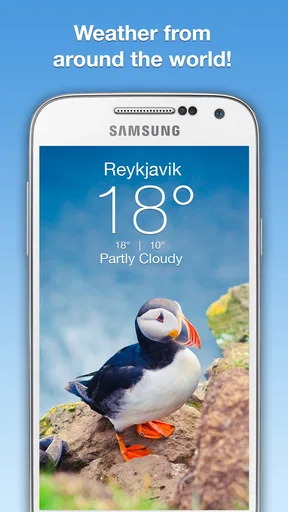
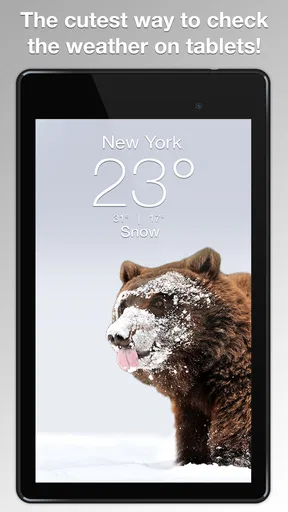
 Analysis by AppCompare
Checking the forecast is usually a practical task: I open an app, look at the temperature, and move on. Wildlife Weather makes that routine feel more like a small visual break. It combines weather information with animal photography, so the forecast becomes something I am more willing to revisit rather than a screen I glance at once and forget. After spending time with it, I see the appeal clearly, although it is not automatically the best choice for every kind of weather user.
This is a free weather app from Weather Creative Inc., built around the idea of pairing everyday forecast checking with images from the animal kingdom. Its store short description, “Wildlife Weather,” is accurate but understated: the personality of the app comes less from complicated weather tools and more from the way nature photography changes the mood of a familiar utility.
The app has a 4.7 average from around 1.4 thousand ratings, with roughly 300 written reviews and over 10 thousand installs. Those figures suggest a focused audience rather than a mass-market weather service. I would approach it as a distinctive companion for basic weather checking, not as a replacement for every specialized forecasting tool.
How Wildlife Weather fits into everyday weather checking
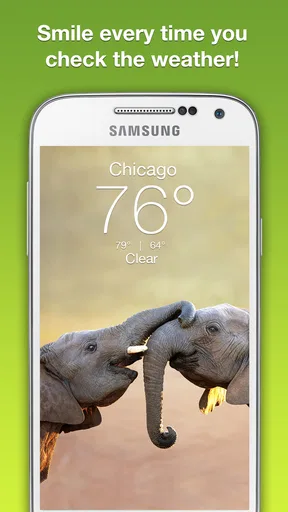
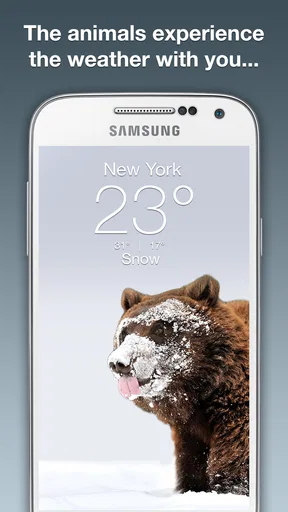
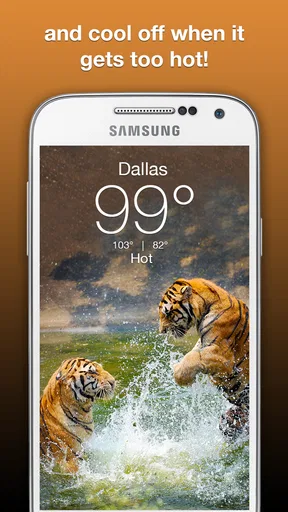
The strongest first impression is its visual identity. Instead of treating the forecast as a wall of numbers, Wildlife Weather gives the animal imagery a central role. That matters because weather apps often become interchangeable: temperature, conditions, hourly details, and a map can look nearly identical from one service to another. Here, the wildlife theme is the reason to choose this particular app.
I found that the visual approach works best during small pauses in the day. Before leaving for work, I can check whether I need a jacket while enjoying a photograph. When planning a walk, the app gives the forecast a calmer, less technical feel. It is also a pleasant option for someone who likes nature photography but does not want to open a separate gallery or social feed just to see something attractive.
That does not mean the photography is merely decoration. It changes how the app is used. A conventional forecast often encourages a single quick visit, while a visually engaging design can make repeated checking feel less repetitive. For people who enjoy wildlife, this is a meaningful advantage rather than a superficial extra.
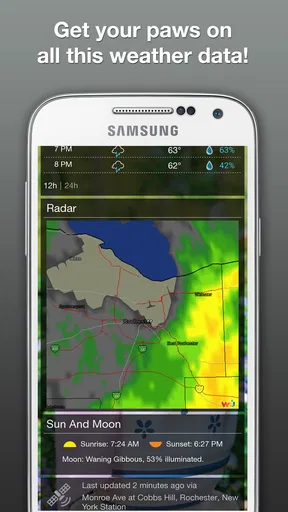
At the same time, I would not mistake a beautiful presentation for a complete meteorological workstation. If your daily decisions depend on detailed radar interpretation, severe-weather monitoring, or highly technical forecasting, you will probably prefer a more specialized service. Wildlife Weather makes the ordinary forecast more enjoyable; it does not need to win every comparison on depth to justify its place on a phone.
Worth Reading Before You Choose

Flipboard Shows What News Apps Must Do Beyond the Feed

Switching to Android Auto Means Rethinking Your Driving Routine

Google Calendar Makes a Crowded Week Easier to Manage

Ludo King Makes the Most of the Minutes Between Plans

Baby Panda World Brings Quick Play to Modern Phones, but Its Game Library Feels Busy

ESPN’s Live Game View Makes Following Close Games Easier
The free starting point and what paid value means here
The app is free to download, which makes trying it straightforward. You can judge the visual style and the basic experience without committing money first. That is important for an app whose main attraction is personal taste: some users will find the combination of animals and weather charming, while others will prefer a denser, more functional interface.
In-app purchases are listed from $1.99 to $29.99 per item. I would therefore separate the decision into two parts. The free access answers whether the concept suits you. Any purchase decision should then depend on whether the additional value matters enough to you, rather than on an assumption that paying is required simply to understand the app.
This pricing range also means I would check the purchase screen carefully before confirming anything. The lower end may feel easy to justify for a favorite visual experience, while the upper end deserves a more deliberate decision. I would not pay just because the app looks polished. I would pay only if I were using it regularly and felt that the extra content or experience had become part of my routine.
That is the honest value equation: the free version lowers the risk of experimenting, but the paid value is personal. A weather app is not usually something I want to collect or browse for long periods, so the purchase makes more sense for a committed wildlife enthusiast than for someone who checks forecasts only when rain is already visible outside.
What the app does well in practice
The best quality is coherence. The weather purpose and the animal imagery belong together naturally because both are connected to the outdoors. The result feels more considered than an ordinary forecast screen with a random decorative background. When an app has a clear identity, I am more likely to remember why I installed it and return to it instead of letting it disappear into a folder.
Another useful strength is emotional tone. Weather information can be disappointing, especially when a planned outing is threatened by clouds or rain. The wildlife presentation gives the checking process a small reward even when the forecast is not ideal. That does not change the weather, of course, but it makes the interaction less dull and less frustrating.
I also see value for households where several people share an interest in animals. A parent might use the forecast as a reason to talk with a child about the featured wildlife, seasons, or outdoor plans. In that situation, the app becomes more than a private utility: it can turn a routine phone check into a brief shared moment.
There is a practical workflow that suits it particularly well. I would open Wildlife Weather when deciding whether an outdoor plan is comfortable, then use a more technical weather source only if conditions look uncertain or important. That two-step approach preserves the app’s pleasant experience without asking it to answer questions better handled by radar, warnings, or specialist forecasting tools.
For travel, I would use it as a quick orientation tool rather than my only source of information. Before heading out for a day in a new place, a simple weather check can help with clothing and timing. If the trip involves hiking, boating, driving through changing conditions, or exposure to dangerous weather, I would verify the situation elsewhere. The app is most valuable when the decision is ordinary and low risk.
Small limitations that affect the choice
The same visual focus that makes Wildlife Weather memorable may feel like a distraction to people who want information immediately. If your ideal weather app opens to a compact, data-heavy dashboard, the wildlife presentation may seem slower or less direct. This is not a flaw in the concept, but it is a genuine mismatch for users who value efficiency above atmosphere.
There is also a risk of overvaluing novelty. Animal photography can make an app enjoyable during the first few days, but long-term value depends on whether you actually want to keep returning for weather checks. I would give the free version enough time to become part of a normal routine before considering any purchase. A striking first impression is not the same as lasting usefulness.
The Teen content rating is another detail worth noting for families. It does not automatically make the app unsuitable for younger users, but parents should consider the rating alongside their own preferences rather than assuming that a nature-focused presentation is designed specifically for children. The wildlife theme may be family-friendly in spirit, yet the official age classification is still Teen.
Compatibility is also relevant for older devices. The app requires Android 7.0 or later, so anyone using an older Android phone should check that basic requirement before planning around it. The current version is 6.2.7, which is useful context when deciding whether the app fits an existing device, especially if that phone is kept for simple tasks rather than frequent upgrades.
Because the app has a relatively focused audience, I would not choose it expecting the same breadth as a major general-purpose weather platform. Large alternatives often make more sense for people who need extensive maps, alerts, multiple forecast views, or a deep history of weather information. Wildlife Weather earns attention through presentation and atmosphere, not by trying to be everything at once.
Who is most likely to get genuine value
I think the clearest audience is someone who checks the weather often and enjoys nature photography. For that person, the app adds a small pleasure to an activity that already happens every day. The free entry point makes it easy to test, and the visual theme gives it a reason to remain installed beside more conventional tools.
It can also suit people who dislike sterile utility apps. Some users do not want every screen optimized for maximum information density. They prefer a calmer interface that still handles the basic purpose. If that sounds like you, Wildlife Weather has a stronger case than its narrow concept might initially suggest.
A realistic example would be a weekend walker deciding whether to leave early. I would check the app while having breakfast, look at the conditions, and decide whether a light jacket or a change of timing makes sense. If the forecast looks uncertain, I would cross-check before setting out. The app handles the first decision pleasantly; it does not need to carry the entire responsibility for route safety.
It may also appeal to someone choosing a weather app for a second device. An older tablet or spare phone used in a kitchen, hallway, or family room does not necessarily need a complex forecasting suite. A visually engaging weather display can make that device more inviting, provided it meets the Android requirement and the available screen experience feels comfortable.
On the other hand, I would tell several users to skip it. Emergency preparedness users should prioritize dependable warning and monitoring tools. Outdoor professionals may need details that a visually led app is not intended to emphasize. People who dislike decorative interfaces may find the wildlife theme unnecessary. Finally, anyone unwilling to consider optional purchases should simply enjoy the free experience and avoid treating the paid range as essential.
How it compares with ordinary alternatives
Compared with a standard weather app, Wildlife Weather is more memorable and less clinical. A typical alternative is often better when I need to scan several data points quickly, compare locations, or study changing conditions. Wildlife Weather is better when I want the forecast to feel pleasant and connected to the outdoors.
Compared with a photography app, it has a clearer practical purpose. I am not opening it primarily to browse a large collection or follow photographers; I am checking the weather and receiving a visual nature experience alongside it. That combination is its distinctive middle ground. It will not replace a dedicated wildlife gallery, but it does not need to.
The trade-off is easy to state: conventional alternatives usually prioritize breadth and speed, while this app prioritizes mood and identity. Neither approach is universally superior. I would keep a detailed weather service available for serious planning and use Wildlife Weather when I want a more enjoyable everyday check. For some people, that combination is more useful than forcing one app to satisfy every need.
My verdict on installing or paying
I recommend installing Wildlife Weather if you like animals, appreciate photography, and want a free weather app with a personality of its own. The concept is specific, easy to understand, and genuinely pleasant in ordinary use. It turns a routine forecast check into a small moment of visual interest without pretending that weather has to be complicated.
I would not recommend paying immediately. Start with the free access, use it during real mornings and outdoor-planning moments, and see whether the imagery makes you return consistently. If it becomes a favorite part of your routine, an optional purchase in the listed range may feel reasonable. If you open it only once out of curiosity, the free experience has already done its job.
My bottom line is simple: choose Wildlife Weather for atmosphere and everyday enjoyment, not as your only serious weather instrument. The app from Weather Creative Inc. has a clear personality, a sensible low-risk entry point, and a niche that ordinary forecast tools rarely address. Its limitations are equally clear, but for the right user, that focused blend of wildlife photography and weather checking is exactly what makes it worth keeping.
Pros
- Clear forecasts tailored to wildlife and outdoor conditions.
- Useful temperature
- wind
- and precipitation details for planning trips.
- Simple interface makes key weather information quick to find.
- Helpful for hikers
- campers
- birdwatchers
- and nature photographers.
- Can support safer decisions when exploring remote outdoor areas.
Cons
- Wildlife-focused information may be limited in some locations.
- Forecast accuracy depends on the quality of local weather data.
- Some features may require an internet connection while outdoors.
- Remote areas may have incomplete coverage or fewer forecast details.
- Weather insights may not replace specialist wildlife or safety guidance.
FAQs for Wildlife Weather
What is Wildlife Weather, and what does the app offer?
Wildlife Weather is designed for users who want to follow weather conditions while spending time outdoors, observing animals, hiking, camping, or photographing nature. It presents relevant forecasts and environmental information in a wildlife-focused context, helping you plan activities around temperature, precipitation, wind, and changing conditions. The exact features may vary depending on your device, location, and the app version available for download.
Does Wildlife Weather require my location, and is it safe to use?
The app may request location access so it can provide weather information for your current area or nearby outdoor destinations. You can usually choose whether to allow location access all the time, only while using the app, or not at all, depending on your operating system. If you prefer greater privacy, enter locations manually when possible and review the app’s permissions and privacy policy before accepting access.
Can I use Wildlife Weather without an internet connection?
Wildlife Weather generally needs an internet connection to retrieve updated forecasts, weather observations, maps, or location-based information. Some previously loaded data may remain temporarily available, but you should not assume that forecasts will stay current offline. Before traveling to a remote area, open the destinations you need while connected and consider downloading additional maps or checking another reliable weather source.
Is Wildlife Weather accurate enough for outdoor and wildlife activities?
The app can be useful for planning outdoor activities, but no weather application should be treated as a guarantee, particularly in forests, mountains, wetlands, or other areas where conditions can change quickly. Forecast accuracy depends on the location, data provider, update frequency, and local terrain. For boating, hunting, long hikes, or severe-weather situations, compare its information with official alerts and local forecasts.
Is Wildlife Weather free to download, and are there in-app purchases?
The download price and available features may differ between Android and iOS, as well as between regions and app versions. Some functions may be free while advanced forecasts, specialized wildlife information, advertising removal, or additional tools could require a subscription or one-time purchase. Check the store listing carefully before installing, including the trial terms, renewal conditions, and whether any purchases are required for the features you want.


